Icon of program: Apache OpenOffice

Apache OpenOffice for Windows

  • Free
  • 4
    9552
  • 1.7M
  • V4.1.16
Free Download for Windows

View an ad to download for free

An open-source office suite for free

Apache OpenOffice is a free, open-source office suite productivity tool available for Linux, Mac, and Windows, managed by the Apache Software Foundation since 2011. It provides a comprehensive set of productivity tools, serving as a compelling, cost-free alternative to proprietary software like Microsoft 365, making essential applications accessible to all. 

Top Recommended Alternative

Apache OpenOffice also features broad compatibility, supporting numerous file formats from other office suites. It receives regular updates for improved functionality, but not too frequently, however, and is available in many languages, with localization requests supported. This commitment to accessibility ensures a user-friendly experience across diverse linguistic and software environments. 

Beyond just an office suite 

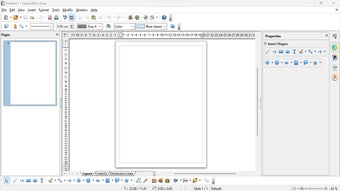
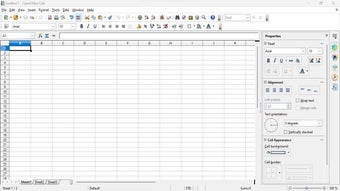
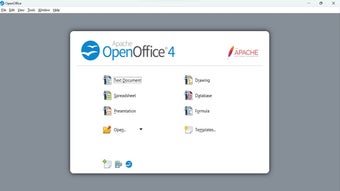
Apache OpenOffice features many core applications for diverse needs. Writer is a versatile word processor for reports and letters. Calc offers powerful spreadsheet capabilities for data analysis and graphical reporting. Impress provides multimedia tools for dynamic presentations, while Draw handles diagrams and 3D graphics. Base manages databases, and Math is for formula editing, offering a complete office solution even for math calculations. 

Creative users can leverage Draw for diagrams and 3D graphics, while Base offers robust database management for forms and reports. Math provides a dedicated module for editing mathematical formulas, ideal for scientific work. Its open-source nature allows free distribution, making it a welcome choice across government, business, and non-profits. Notably, it pioneered the adoption of the OASIS OpenDocument Format as a standard. 

Recent updates focus on stability and security 

Updates to Apache OpenOffice have focused on improving stability, fixing bugs, and addressing security concerns rather than adding new features. Updates include patches for vulnerabilities, improvements to file handling, and minor adjustments to performance across different operating systems. These changes ensure that the suite continues to function reliably while maintaining compatibility with existing workflows. Although it has limited Office compatibility, and lacks minor feature like a dedicated “Charts” option. 

It runs on multiple platforms, supports a variety of file formats, and does not require an internet connection to function. This makes it a reliable option for users who want full control over their documents without relying on cloud services. At the same time, compatibility with newer file formats and advanced features may not always match more recent office suites. This creates a limited modern features. 

A dependable office suite that still values accessibility and control 

Apache OpenOffice remains a practical choice for users who want a free, offline-capable office suite with all the essential tools for writing, spreadsheets, presentations, databases, and more. Its open-source foundation and broad platform support continue to make it accessible and useful. However, its slower pace of development and more limited compatibility with newer office features mean it feels more dependable than cutting-edge in today’s productivity landscape. 

  • Pros

    • Free and open-source
    • Includes a full set of office tools
    • Works offline across multiple platforms
    • Supports many file formats
    • Good for users who want local document control
  • Cons

    • Slower development pace
    • Limited compatibility with newer office features
    • Feels less modern than newer office suites
    • Some advanced tools and options are missing
 0/3

App specs

Also available in other platforms

Program available in other languages


Icon of program: Apache OpenOffice

Apache OpenOffice for PC

  • Free
  • 4
    9552
  • 1.7M
  • V4.1.16
Free Download for PC

View an ad to download for free


User reviews about Apache OpenOffice

4

17 reviews

Add review

Main reviews for you

  • Anonymous user

    I have been using Apache OpenOffice and I am grateful daily. I LOVE it. Thank you to all who have made it possible for me.

  • Anonymous user

    Apache Open Office is great! It is very user friendly from download to use of the software. I do not believe any of the other software options that are available anything over on Apache Open Office. I have used it for years on and off.

  • Anonymous user

    I like it alot Just wish it was a bit easier to use & easier to print.its been ages since I done spread sheets and at the time it was done by hand.I AM LEARNING SLOWLY

  • Anonymous user

    Nice but needs an add and subtract function in the spreadsheet. I like it,but could you add a simple add and subtract function to the spreadsheet? Rich

  • Anonymous user

    Having problems with ApacheOpenOffice . So far I have not been able to use OpenOffice. I need single spacing when writing, so click in "single", but it still gives me double spacing, and up in the left corner it says "default". Either I do not know how to use the website, or the website is malfunctioning. Also to participate in their forum they ask for a digital signature, which I have no idea how this works. People who create websites need help.

  • Anonymous user

    Collatebox the best alternative to google spreadsheets. OpenOffice is pretty decent, but I think CollateBox is a better tool Pros: online collaboration Cons: nothing

More

You may also like

Alternatives to Apache OpenOffice

Explore Apps

Related Articles

Latest articles

Laws concerning the use of this software vary from country to country. We do not encourage or condone the use of this program if it is in violation of these laws.
Softonic

Is Apache OpenOffice safe?

100/100

Score result: Clean

This file passed a comprehensive security scan using VirusTotal technology. It is safe to download.

  • Virus free
  • Spyware free
  • Malware free
  • Verified by Security Partners

    VirusTotal logo

Scan Info

Last scan
Tuesday, April 14, 2026
Scan provider
VirusTotal · Full report

File Integrity

File
Apache_OpenOffice_4.1.16_Win_x86_install_en-US.exe
SHA256
0ea97aedb1c77838b9c6ee9e7a9c5161933b35b703e4ccbafa6a9abde7f669ca
SHA1
5c5a4f42e402b3d75f561c339d7bc57138485b89

Softonic security commitment

Apache OpenOffice has been thoroughly scanned by our advanced security systems and verified by industry-leading partners. This file comes from the official developer and has passed all our security checks, showing no signs of viruses, malware, or spyware. For more information, visit our Security and Trust Center